Before deploying an Algo, you can explore its detailed performance data on Stratzy to understand its historical returns, risk, consistency, drawdowns, and trading behaviour.
To view the performance of an Algo, select the respective Algo from the Algo Listing page.
You’ll find the following sections:
1. Algo Performance
The Algo Performance section provides an overall view of the Algo’s historical performance since it went LIVE. You can use this section to evaluate how the Algo has performed across different time periods.
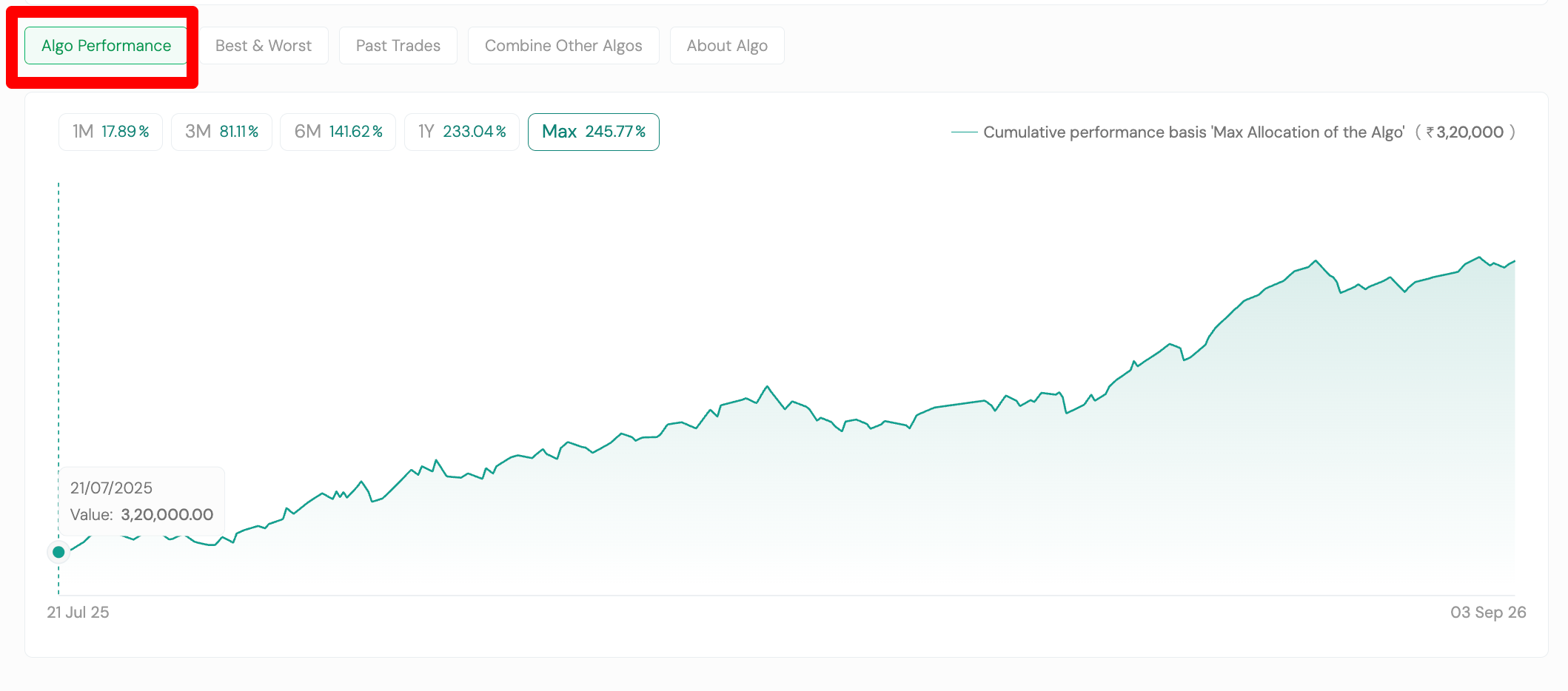
Equity Curve
The Equity Curve shows the cumulative growth of the Algo’s returns over time, based on the Maximum Allocation of the Algo.
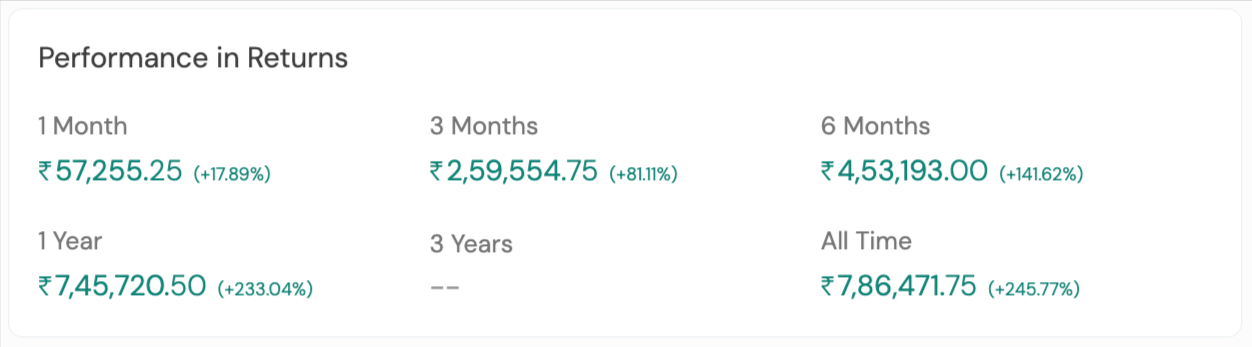
Performance in Returns
You can view the returns generated over 1 Month, 3 Months, 6 Months, 1 Year, 3 Years, and All Time.
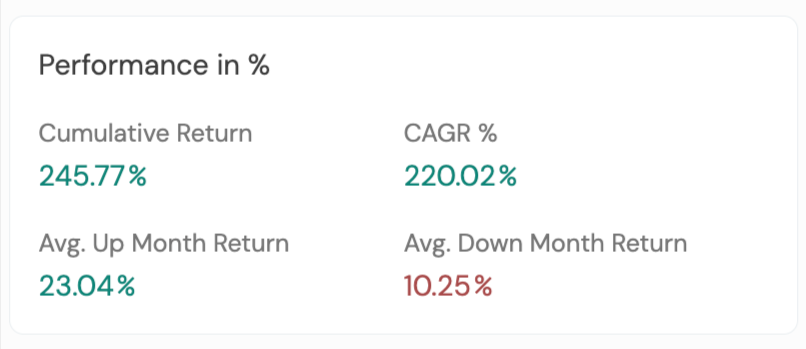
Performance in %
This section provides key return metrics, including:
-
Cumulative Return – Total percentage return generated by the Algo since it went LIVE.
-
CAGR – Compound Annual Growth Rate of the Algo.
-
Average Up Month Return – Average return during profitable months.
-
Average Down Month Return – Average loss during loss-making months.
Characteristics of the Algo
This section helps you understand the nature and design of the strategy, including:
-
Operates On – Exchange on which the Algo operates, such as NSE, BSE, or MCX.
-
Built On – Underlying instrument, such as Nifty 50, Bank Nifty, Sensex, etc.
-
Segment – Equity, Futures, or Options.
-
Favourable In – Market conditions in which the Algo generally performs better, such as Volatile or Sideways markets.
-
Strategy – Strategy category, such as Option Buying, Credit Spread, Short Straddle, Short Strangle, Swing, Investing, and more.

Algo Trade Metrics
These metrics help you understand the Algo’s trading behaviour and risk profile:
-
Frequency of Trade
-
Success Ratio
-
Average Profit in Trade
-
Average Loss in Trade
-
Risk
-
Risk: Reward
-
Average Drawdown
-
Maximum Drawdown
-
Average Time to Recovery
-
Maximum Time to Recovery
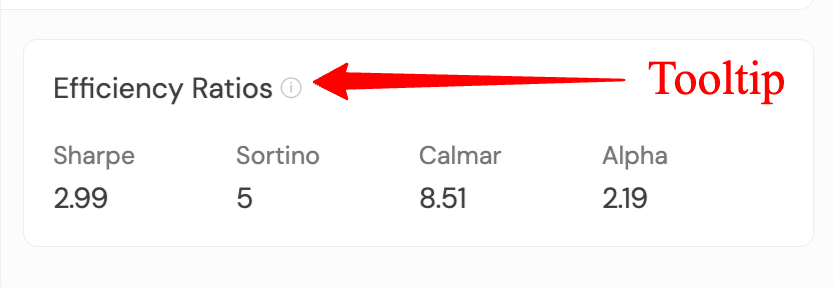
 Tip: Click the ⓘ icon next to a metric to understand what it means and how to interpret it.

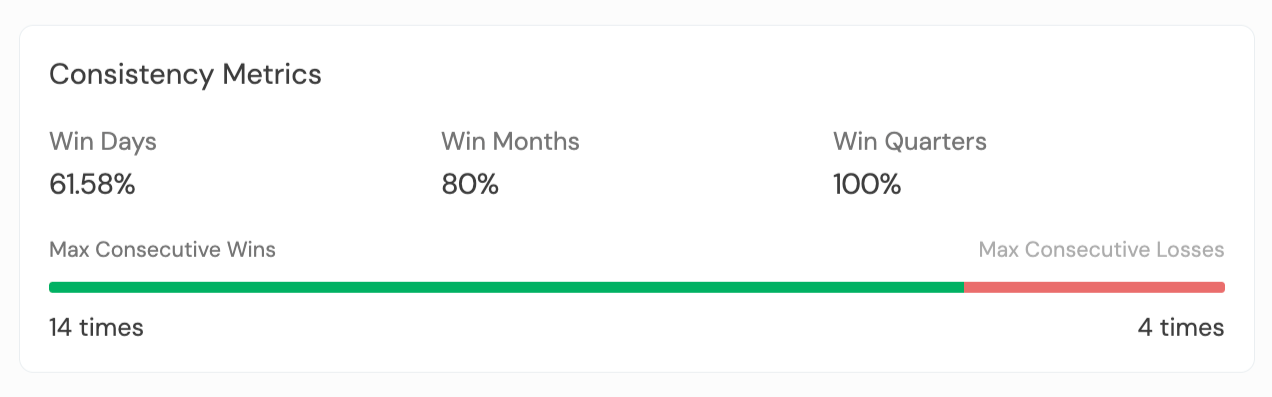
Consistency Metrics
These metrics help you assess how consistently the Algo has performed over time:
-
Win Days – Percentage of profitable trading days.
-
Win Months – Percentage of profitable months.
-
Win Quarters – Percentage of profitable quarters.
-
Maximum Consecutive Wins – Highest number of consecutive winning trades.
-
Maximum Consecutive Losses – Highest number of consecutive losing trades.
Efficiency Ratios
These ratios help evaluate the Algo’s returns in relation to the risk taken:
-
Sharpe Ratio – Measures risk-adjusted returns.
-
Sortino Ratio – Measures returns while considering downside risk.
-
Calmar Ratio – Compares returns against maximum drawdown.
-
Alpha – Indicates how the Algo has performed relative to its benchmark.
2. Best & Worst
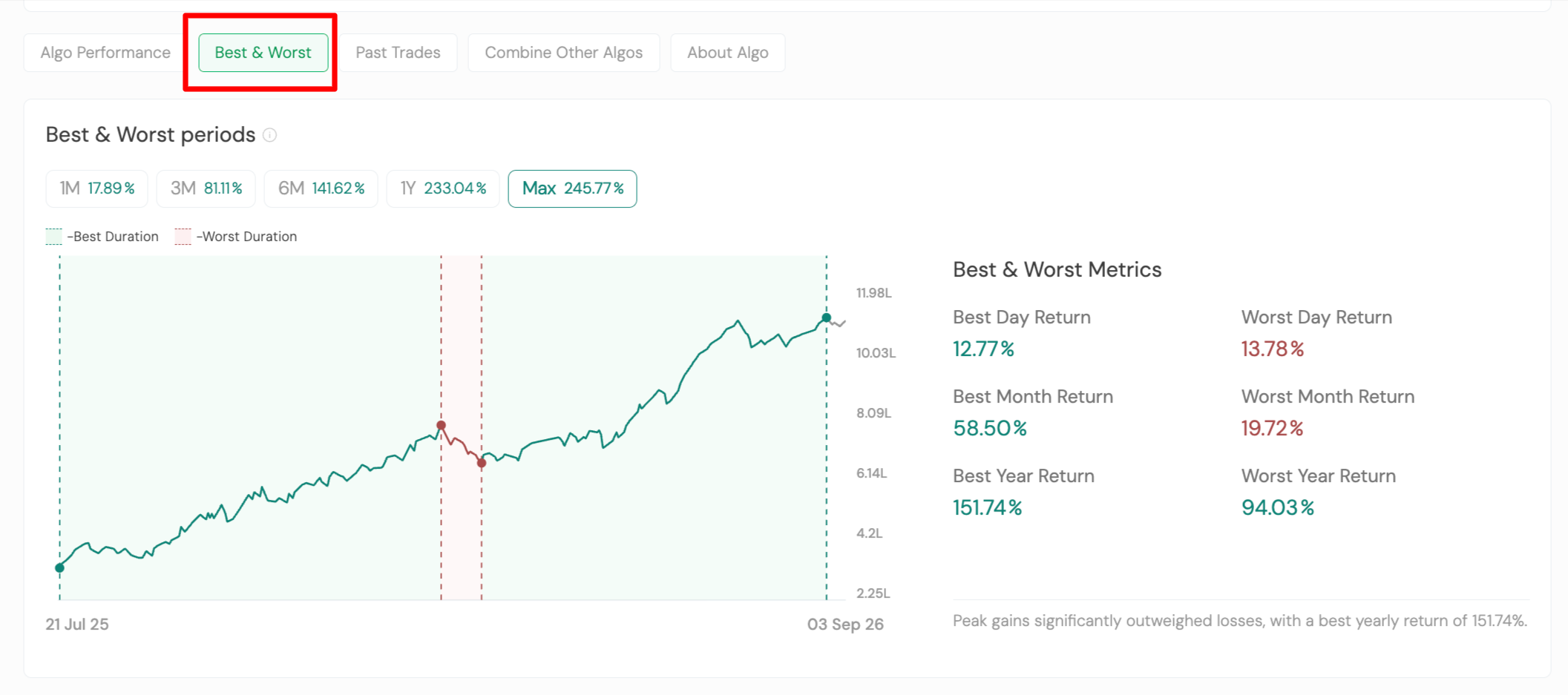
The Best & Worst section helps you understand the Algo’s strongest and weakest historical periods.
You can compare performance across 1 Month, 3 Months, 6 Months, 1 Year, and All Time.
Best & Worst Metrics
You can view:
-
Best Day Return
-
Worst Day Return
-
Best Month Return
-
Worst Month Return
-
Best Year Return
-
Worst Year Return
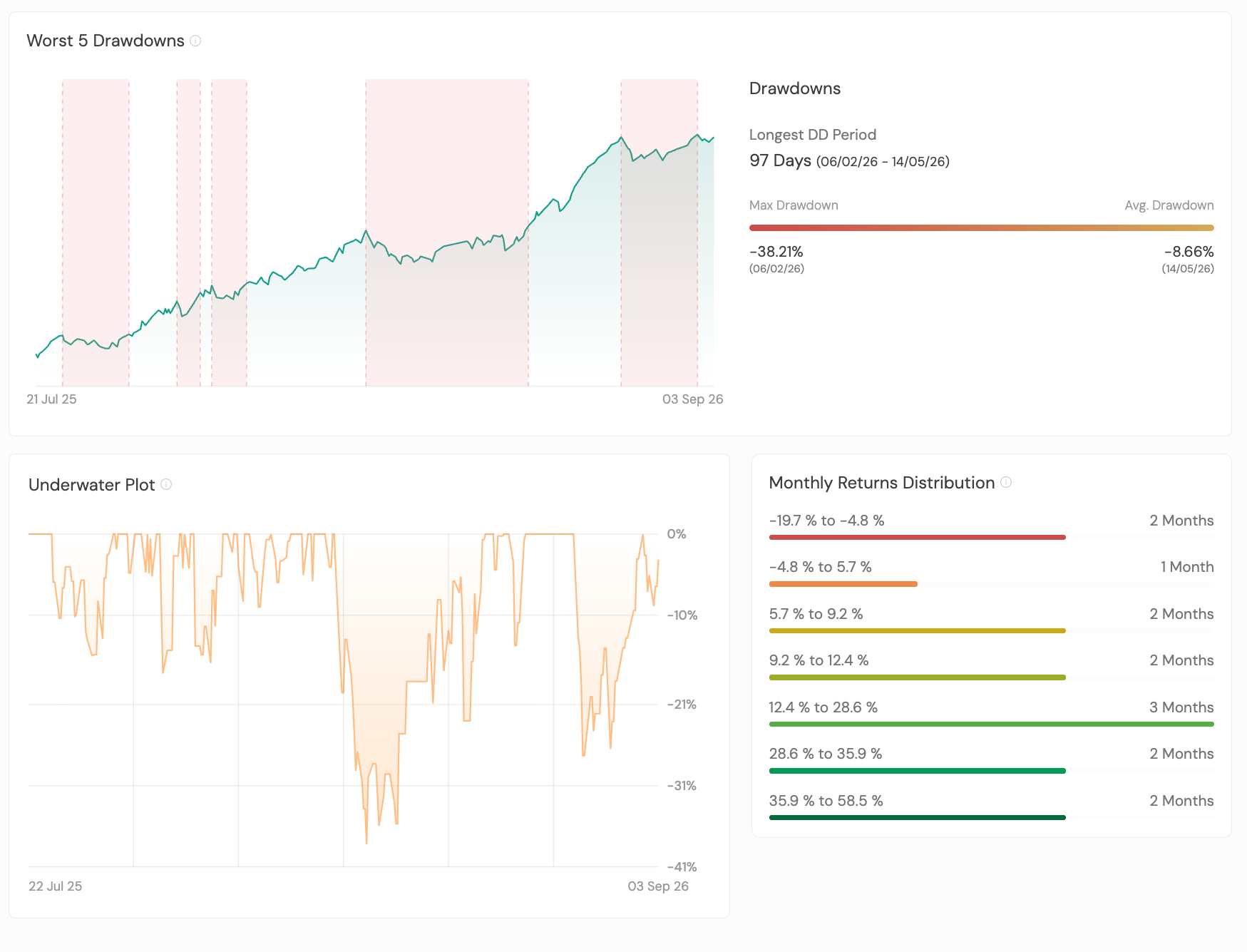
Drawdown Analysis
You can also review:
-
Worst 5 Drawdown Periods – The five largest historical drawdown periods.
-
Longest Drawdown Period – The longest period the Algo remained below its previous peak before recovering.
-
Underwater Plot – Helps visualise the depth and duration of drawdowns.
-
Monthly Returns Distribution – Shows how frequently different levels of monthly returns have occurred.
3. Past Trades
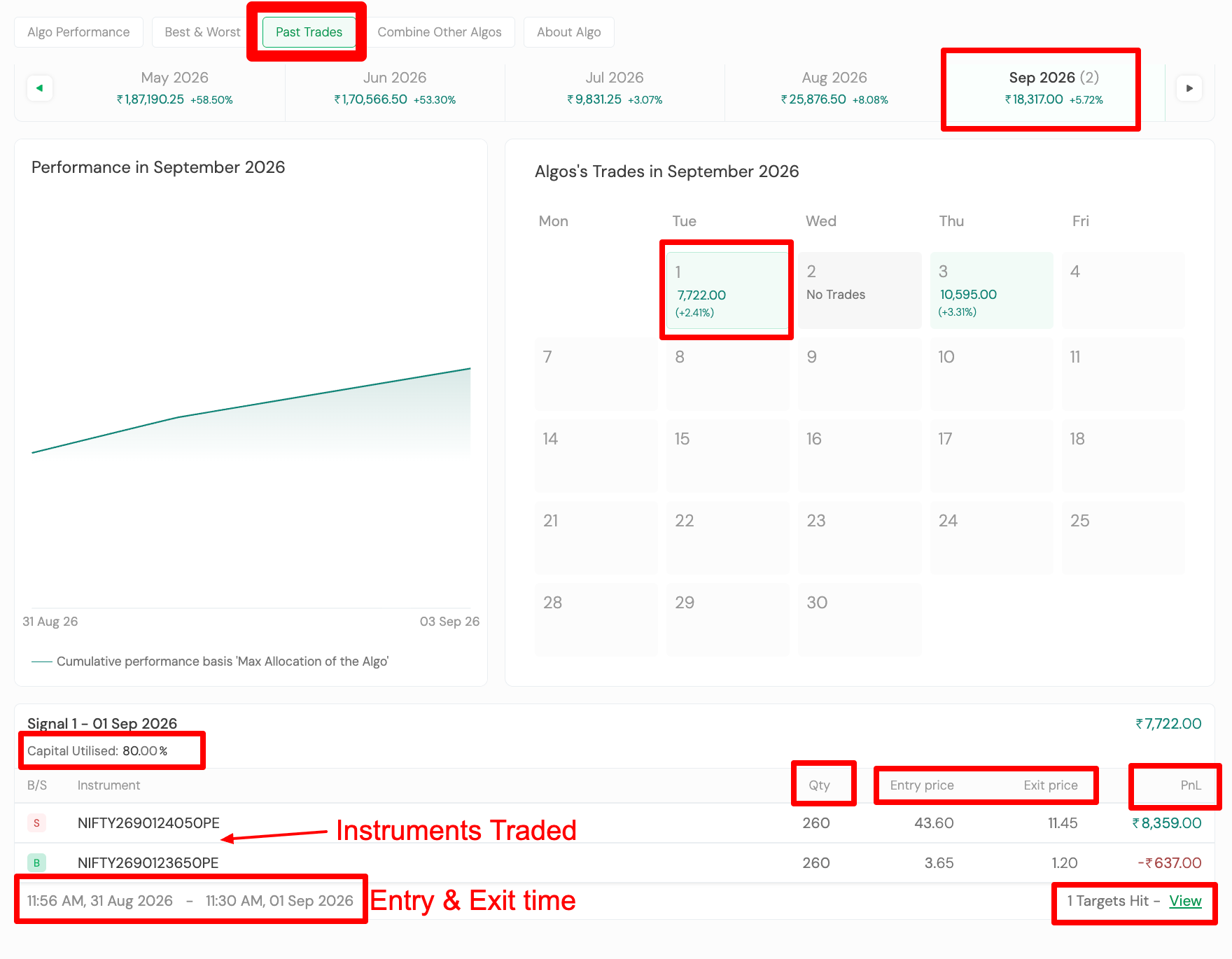
The Past Trades section lets you analyse the historical trades taken by the Algo.
You can:
-
Browse monthly performance through the calendar view.
-
Select any trading day to see the trades taken on that day.
-
Review individual trade details, including:
-
Entry Time
-
Exit Time
-
Entry Price
-
Exit Price
-
Instruments Traded
-
Quantity traded based on Maximum Allocation
-
Profit or Loss
-
Capital Utilised for a trade
-
Target(s) Hit – Number of partial profit targets achieved before the trade was exited.
-
This section is particularly useful when you want to understand how the Algo behaved on specific trading days and across individual trades.
4. About Algo
The About Algo section provides additional information about the strategy, including:
-
How the Algo works
-
The type of market it is designed for
-
Other relevant strategy information
Evaluate the Algo as a Whole
No single metric tells the complete story of an Algo’s performance.
For a more comprehensive view, we recommend looking at the returns, drawdowns, consistency metrics, trade statistics, recovery periods, and past trades together.
This gives you a better understanding of the Algo’s historical performance, risk profile, consistency, and trading behaviour before making a decision on whether it fits your trading approach.